Chapter 4: Special Symbols and Characters Guide
This chapter completes the QWERTY typing mastery by teaching special symbols, punctuation marks, and advanced characters. USTAAD's Special Symbols Chapter covers mathematical symbols, currency signs, brackets, and programming-related characters through four comprehensive exercises.
What You Will Learn in Chapter 4
- Complete special character set for professional typing
- Punctuation marks and their proper usage
- Mathematical and currency symbols
- Programming-related characters and operators
- Advanced character combinations for technical writing
- Context-appropriate symbol usage in different scenarios
Key Chapter 4 Benefits
- Complete character mastery for all typing needs
- Professional writing skills with proper punctuation
- Technical typing for programming and math
- Symbol fluency in various contexts
- Advanced combinations for complex documents
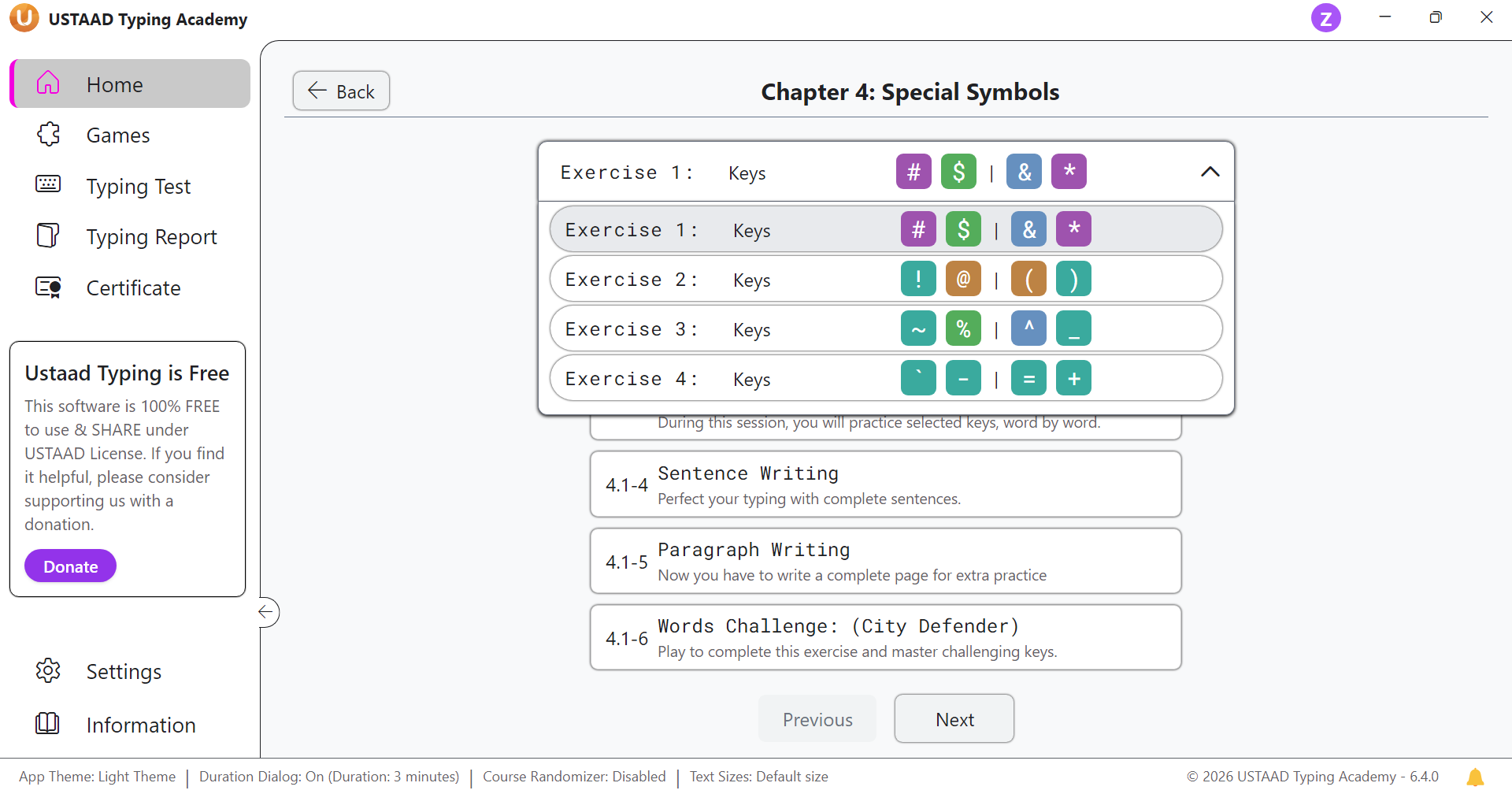
Chapter 4 Structure
Chapter 4 contains four exercises. Each exercise includes six lessons that reinforce special symbols through practice, challenges, and real-world applications.
Exercise 1: Keys [#, $, &, *]
- 4.1-1 Keys Practice: Learn the symbols #, $, &, * with proper finger placement
- 4.1-2 Keys Challenge (City Defender): Practice these symbols in the City Defender game
- 4.1-3 Word Practice: Type symbol combinations and sequences
- 4.1-4 Sentence Writing: Write sentences incorporating these special characters
- 4.1-5 Paragraph Writing: Compose paragraphs with symbolic content
- 4.1-6 Words Challenge (City Defender): Reinforce with City Defender word challenges
Exercise 2: Keys [!, @, (, )]
- 4.2-1 Keys Practice: Add exclamation, at-sign, and parentheses to your typing
- 4.2-2 Keys Challenge (City Defender): Practice in City Defender game format
- 4.2-3 Word Practice: Type sequences using !, @, (, )
- 4.2-4 Sentence Writing: Build sentences with these punctuation symbols
- 4.2-5 Paragraph Writing: Write paragraphs incorporating these characters
- 4.2-6 Words Challenge (City Defender): Final reinforcement with City Defender
Exercise 3: Keys [~, %, ^, _]
- 4.3-1 Keys Practice: Learn tilde, percent, caret, and underscore symbols
- 4.3-2 Keys Challenge (City Defender): Practice in interactive game format
- 4.3-3 Word Practice: Type combinations with ~, %, ^, _
- 4.3-4 Sentence Writing: Create sentences using these technical symbols
- 4.3-5 Paragraph Writing: Compose paragraphs with advanced characters
- 4.3-6 Words Challenge (City Defender): Reinforce through City Defender challenges
Exercise 4: Keys [\``, -, =, +`]
- 4.4-1 Keys Practice: Add backtick, hyphen, equals, and plus symbols
- 4.4-2 Keys Challenge (City Defender): Practice in game environment
- 4.4-3 Word Practice: Type sequences with `, -, =, +
- 4.4-4 Sentence Writing: Write sentences incorporating these symbols
- 4.4-5 Paragraph Writing: Create paragraphs with complete symbol set
- 4.4-6 Words Challenge (City Defender): Final chapter reinforcement
Symbol Categories Covered
Punctuation Marks
- Period (.) and comma (,) for sentence structure
- Exclamation (!) and question mark (?) for emphasis
- Parentheses (()) for additional information
- Hyphen (-) for compound words
Mathematical Symbols
- Plus (+) and equals (=) for equations
- Percent (%) for ratios and statistics
- Caret (^) for exponents and superscripts
Currency and Special Characters
- Dollar sign ($) for monetary values
- Ampersand (&) for "and" in formal writing
- Asterisk (*) for footnotes and multiplication
- At sign (@) for email addresses
Programming Symbols
- Hash (#) for comments and hashtags
- Backslash () for escape sequences
- Underscore (_) for variable names
- Tilde (~) for approximations and home directories
Typing Symbols in Different Contexts
Professional Writing
- Business letters: Proper use of periods, commas, and parentheses
- Reports: Mathematical symbols for data presentation
- Emails: At signs and proper punctuation
Programming and Coding
- Variable naming: Underscores and proper operators
- Comments: Hash symbols and slashes
- Equations: Plus, equals, and mathematical operators
Everyday Communication
- Social media: Hashtags, at signs, and emojis
- Text messaging: Exclamation points and question marks
- Web addresses: Slashes and dots
Advanced Character Combinations
Common Programming Patterns
- Assignment:
variable = value; - Comments:
# This is a comment - Functions:
function_name() - Paths:
/path/to/file
Mathematical Expressions
- Equations:
x + y = z - Percentages:
50% complete - Exponents:
x^2 + y^2 = z^2
Professional Formatting
- Phone numbers:
(555) 123-4567 - Currency:
$123.45 - Dates:
12/25/2023
Why Chapter 4 Matters
Chapter 4 completes your QWERTY typing proficiency. This chapter improves:
- Professional writing with complete punctuation
- Technical typing for programming and math
- Symbol accuracy in various contexts
- Advanced fluency for complex documents
Progress Goals for Special Symbols Chapter
- Accuracy: 95%+ with symbol combinations
- Speed: 30–40 WPM with mixed content
- Practice: 20–30 minutes daily
- Focus: Proper symbol usage in context