Chapter 3: Numbers Chapter - 0-9 Row Mastery
This chapter focuses on mastering the number row (0-9 keys) on the top row of the QWERTY keyboard. USTAAD's Numbers Chapter teaches efficient numeric typing through four exercises, covering key placement, number combinations, and practical scenarios like dates and phone numbers.
What You Will Learn in Chapter 3
- Top row number key placement and finger assignment
- Differences between number pad and top row typing
- Common number combinations (dates, phone numbers, codes)
- Practical number typing scenarios for data entry
- Speed and accuracy with numeric sequences
- Integration of numbers with existing typing skills
Key Chapter 3 Benefits
- Numeric fluency for data entry and forms
- Top row coordination with proper finger positioning
- Practical applications for phone numbers and dates
- Speed development in numeric typing
- Accuracy improvement with number sequences
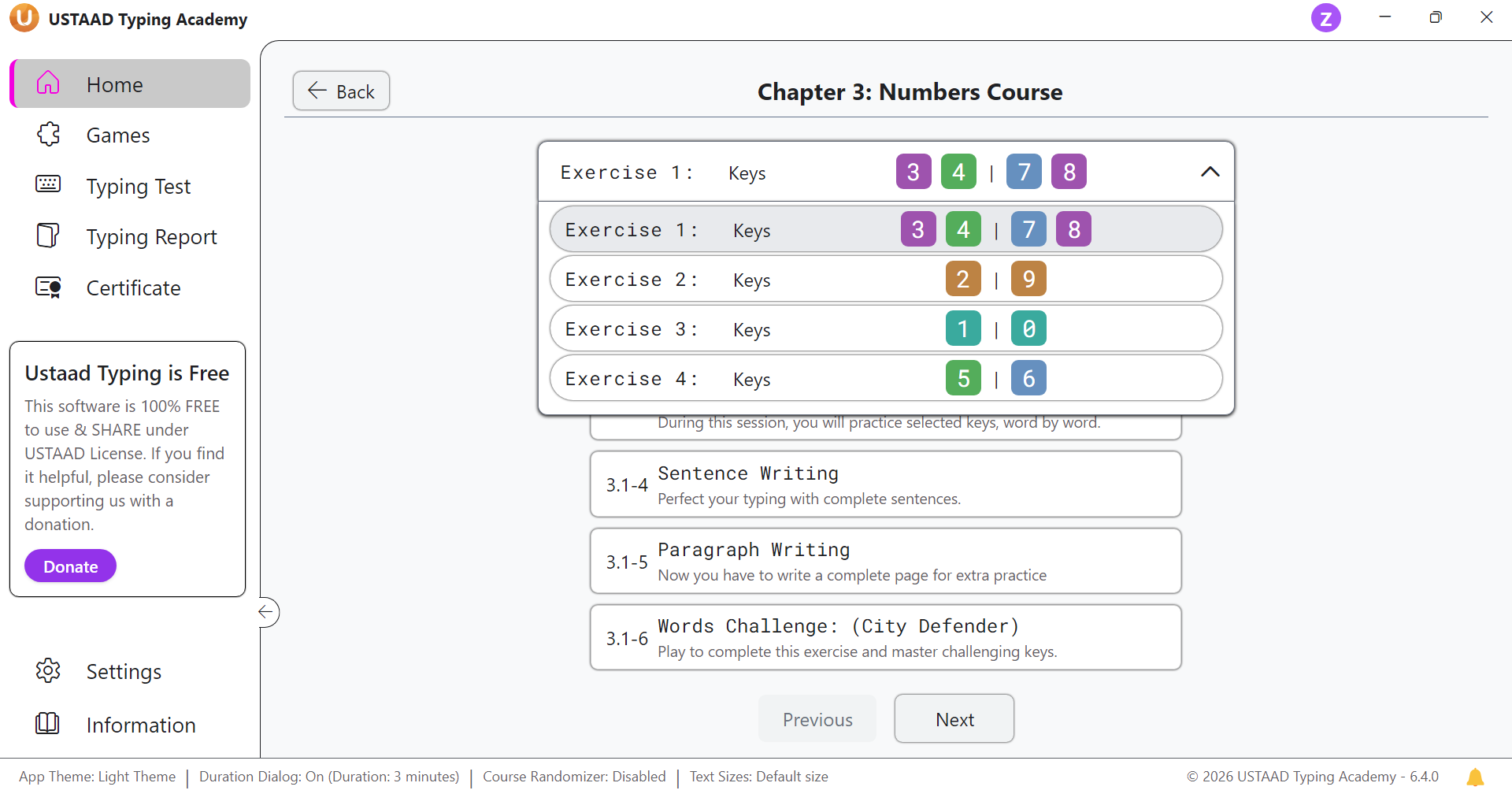
Chapter 3 Structure
Chapter 3 contains four exercises. Each exercise includes six lessons that reinforce number keys through practice, challenges, and real-world applications.
Exercise 1: Keys [3, 4, 7, 8]
- 3.1-1 Keys Practice: Learn the number keys 3, 4, 7, 8 with proper finger placement
- 3.1-2 Keys Challenge (City Defender): Practice these numbers in the City Defender game
- 3.1-3 Word Practice: Type number combinations and sequences
- 3.1-4 Sentence Writing: Write sentences incorporating these numbers
- 3.1-5 Paragraph Writing: Compose paragraphs with numeric content
- 3.1-6 Words Challenge (City Defender): Reinforce with City Defender word challenges
Exercise 2: Keys [2, 9]
- 3.2-1 Keys Practice: Add numbers 2 and 9 to your typing repertoire
- 3.2-2 Keys Challenge (City Defender): Practice in City Defender game format
- 3.2-3 Word Practice: Type sequences using 2 and 9
- 3.2-4 Sentence Writing: Build sentences with these number keys
- 3.2-5 Paragraph Writing: Write paragraphs incorporating 2 and 9
- 3.2-6 Words Challenge (City Defender): Final reinforcement with City Defender
Exercise 3: Keys [1, 0]
- 3.3-1 Keys Practice: Learn the foundational numbers 1 and 0
- 3.3-2 Keys Challenge (City Defender): Practice in interactive game format
- 3.3-3 Word Practice: Type combinations with 1 and 0
- 3.3-4 Sentence Writing: Create sentences using these keys
- 3.3-5 Paragraph Writing: Compose paragraphs with 1 and 0
- 3.3-6 Words Challenge (City Defender): Reinforce through City Defender challenges
Exercise 4: Keys [5, 6]
- 3.4-1 Keys Practice: Add the middle numbers 5 and 6
- 3.4-2 Keys Challenge (City Defender): Practice in game environment
- 3.4-3 Word Practice: Type sequences with 5 and 6
- 3.4-4 Sentence Writing: Write sentences incorporating these numbers
- 3.4-5 Paragraph Writing: Create paragraphs with numeric content
- 3.4-6 Words Challenge (City Defender): Final chapter reinforcement
Number Pad vs Top Row Differences
Top Row Numbers (QWERTY Keyboard)
- Location: Top row of main keyboard
- Finger assignment: Index and middle fingers primarily
- Reach: Requires slight upward finger extension
- Common use: Integrated with alphabetic typing
Numeric Keypad
- Location: Separate keypad on right side
- Finger assignment: Dedicated numeric typing
- Reach: Minimal movement, clustered layout
- Common use: Dedicated numeric data entry
When to Use Each
- Top row: General typing, mixed alphanumeric text
- Number pad: Heavy numeric data entry, accounting work
Common Number Combinations
Dates
- MM/DD/YYYY: 12/25/2023
- DD/MM/YYYY: 25/12/2023
- YYYY-MM-DD: 2023-12-25
Phone Numbers
- US format: (555) 123-4567
- International: +1 555 123 4567
Other Common Patterns
- ZIP codes: 12345
- Credit cards: 1234 5678 9012 3456
- Time: 12:30 PM
- Currency: $123.45
Practical Number Typing Scenarios
Data Entry
- Forms and spreadsheets: Entering numeric data efficiently
- Inventory systems: Product codes and quantities
- Financial records: Amounts and account numbers
Everyday Use
- Phone numbers: Contact information entry
- Addresses: Street numbers and postal codes
- Calculations: Basic math with keyboard input
Professional Applications
- Accounting: Invoice numbers and amounts
- Programming: Numeric constants and arrays
- Database work: ID numbers and serial codes
Why Chapter 3 Matters
Chapter 3 bridges alphabetic typing with numeric data entry. This chapter improves:
- Numeric accuracy for professional work
- Top row coordination with existing skills
- Data entry speed for forms and spreadsheets
- Practical typing for real-world scenarios
Progress Goals for Numbers Chapter
- Accuracy: 95%+ in number sequences
- Speed: 25–35 WPM with numeric content
- Practice: 15–25 minutes daily
- Focus: Smooth transitions between numbers and letters