Urdu Keyboard Layouts Guide
Typing in Urdu becomes significantly easier when you choose the right keyboard layout. There are several Urdu keyboard layouts available, each designed for different typing styles and user preferences.
This guide will help you understand the most commonly used Urdu keyboard layouts and how to get started with them.
What are Urdu Keyboard Layouts?
Urdu keyboard layouts define how Urdu letters are mapped onto your physical keyboard. Since standard keyboards are designed for English, these layouts allow users to type Urdu efficiently without needing a special keyboard.
Different layouts exist because users have different needs:
- Beginners prefer easier, phonetic typing
- Professionals may prefer traditional layouts
- Some layouts are optimized for speed and accuracy
Popular Urdu Keyboard Layouts
There are several Urdu keyboard layouts available online, but the most widely used ones are:
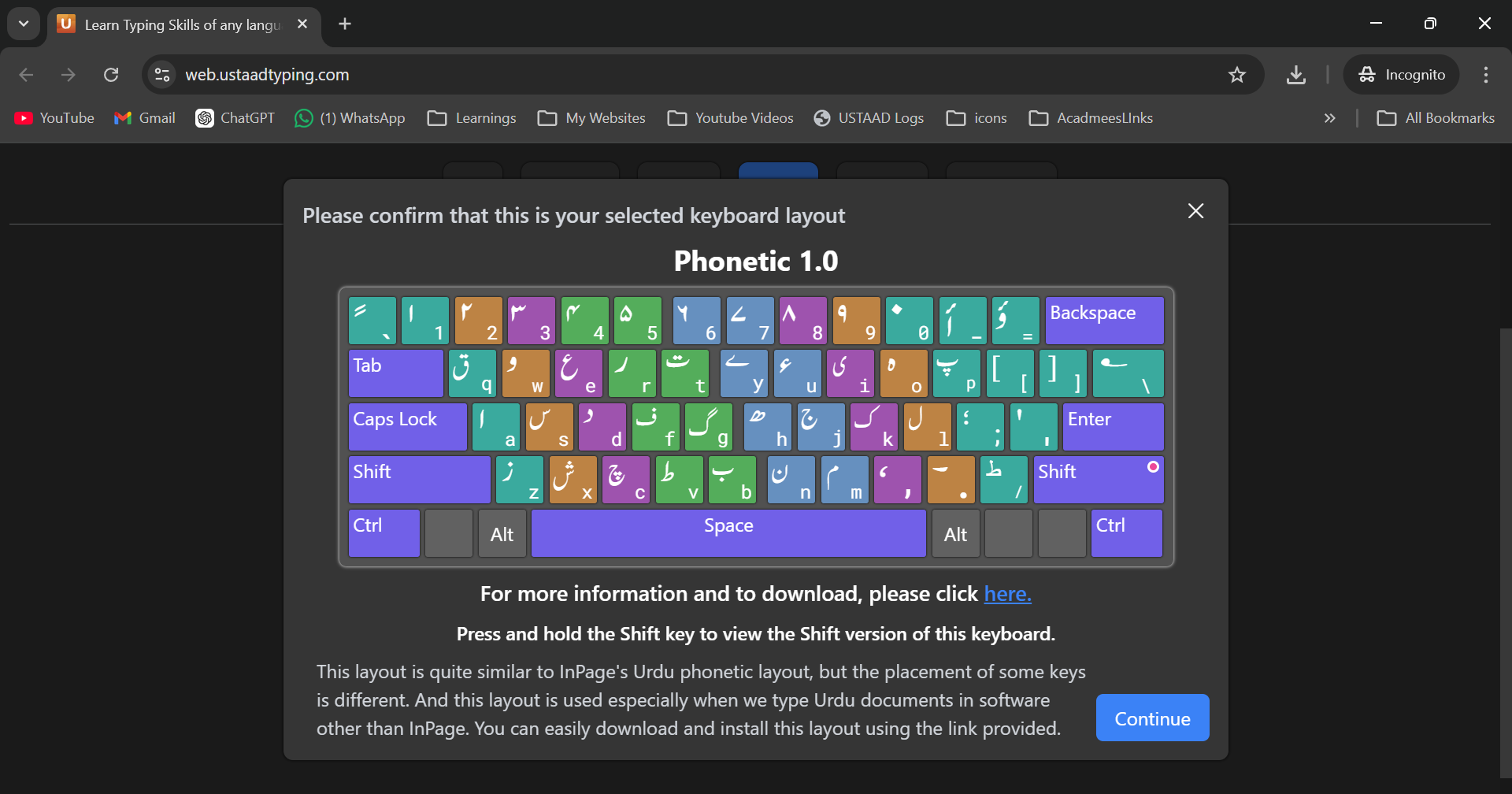
1. Urdu Phonetic Keyboard (1.0)
- One of the earliest and most commonly used layouts
- Designed based on English sound mapping
- Easy for beginners to learn
- Widely supported across systems
👉 Example:
- Press "A" → ا
- Press "B" → ب
This layout is ideal if you're new to Urdu typing.
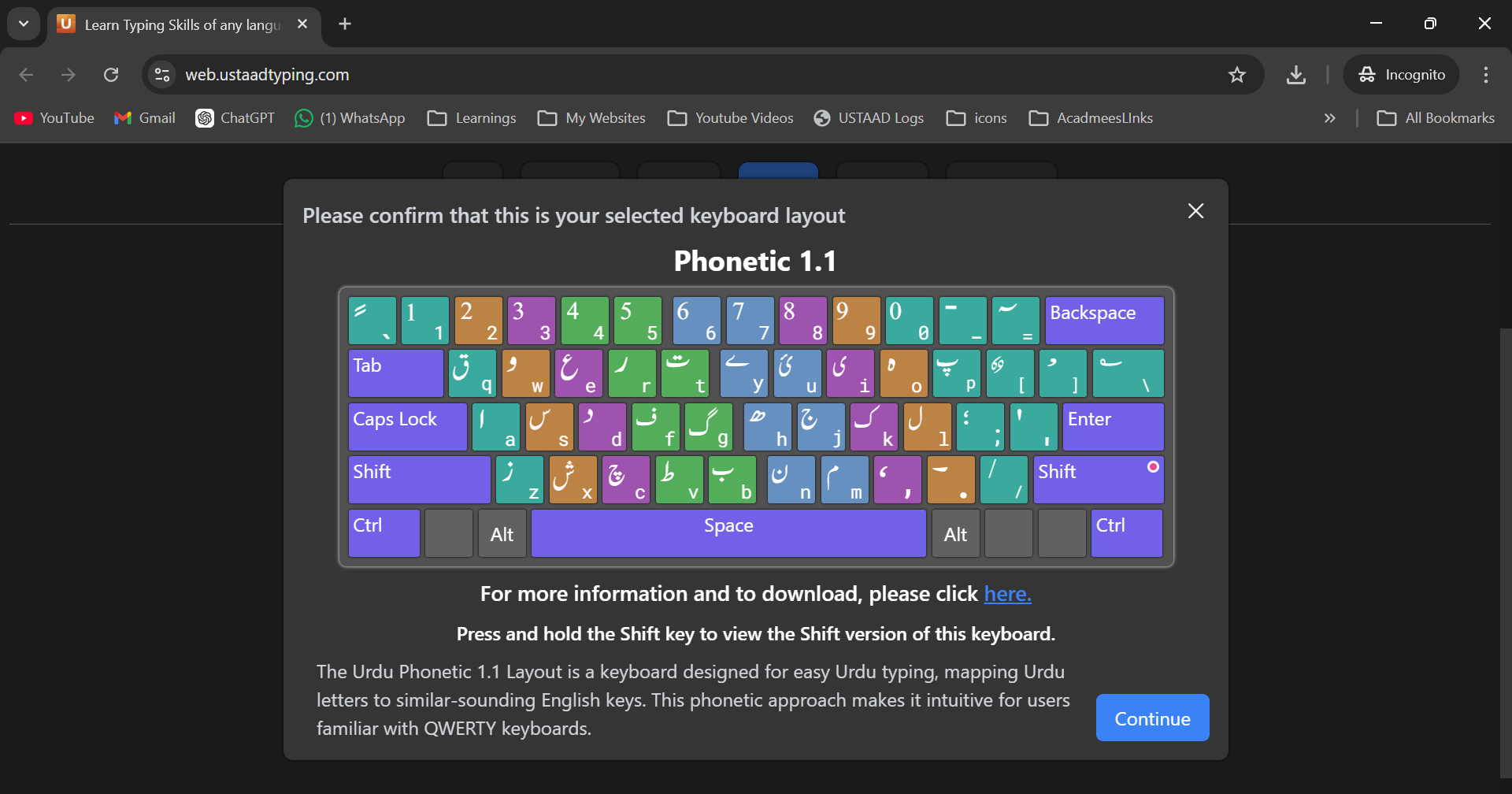
2. Urdu Phonetic Keyboard (1.1)
- Improved version of Phonetic 1.0
- Better key placement and optimization
- More consistent typing experience
- Preferred by many intermediate and advanced users
This version is considered more refined and efficient compared to 1.0.
Official Urdu Keyboard Resources
You can explore and download official Urdu keyboard layouts from the Center for Research in Urdu Language Processing (CRULP):
👉 https://cle.org.pk/software/localization/keyboards/CRULPphonetickbv1.1.html
On this website, you will find:
- Multiple Urdu phonetic keyboard layouts
- Installation files
- Layout charts
- Additional language tools
There are many variations available, but in practice:
✅ Urdu Phonetic 1.0 and 1.1 are the most commonly used and widely accepted standard layouts
Keyboard Layout Visuals
Below are the visual layouts for better understanding:
Urdu Phonetic 1.0 Layout
Urdu Phonetic 1.1 Layout
Which Layout Should You Choose?
- Beginner? → Start with Phonetic 1.0
- Want better speed & efficiency? → Use Phonetic 1.1
- Already familiar? → Stick to your current layout
There is no “one perfect layout” — the best one is the one you are comfortable with.
Learn Urdu Typing with USTAAD Typing Academy
To make learning easier, USTAAD Typing Academy provides structured typing courses for both:
- Urdu Phonetic 1.0
- Urdu Phonetic 1.1
You can:
- Download Urdu typing courses
- Practice with guided lessons
- Improve speed and accuracy
- Track your progress
Whether you're a beginner or advanced learner, you can start typing Urdu easily with step-by-step training.
Final Thoughts
Urdu typing becomes simple once you understand your keyboard layout. While there are many layouts available, Phonetic 1.0 and 1.1 remain the most standard and widely used options.
Choose one layout, stay consistent, and practice regularly — that’s the key to mastering Urdu typing.