Colemak Variants Explained (ANSI, ISO, Ortholinear, DH)
This technical guide explores the various Colemak layout variants available in USTAAD Typing Academy. Understanding these variants helps you choose the right version for your keyboard hardware and optimize your typing experience.
Colemak Variants Overview
Colemak exists in multiple variants to accommodate different keyboard physical layouts and ergonomic preferences. Each variant maintains Colemak's core efficiency while adapting to specific keyboard designs.
Two Main Families
- Vanilla Colemak — Original Colemak layout
- Colemak-DH — Enhanced version with improved ergonomics
Three Physical Formats
- ANSI — Standard US keyboard layout
- ISO — European keyboard layout
- Ortholinear — Grid-based layout without staggered rows
Vanilla Colemak Variants
Vanilla Colemak is the original layout created by Shai Coleman, offering significant improvements over QWERTY while maintaining learnability.
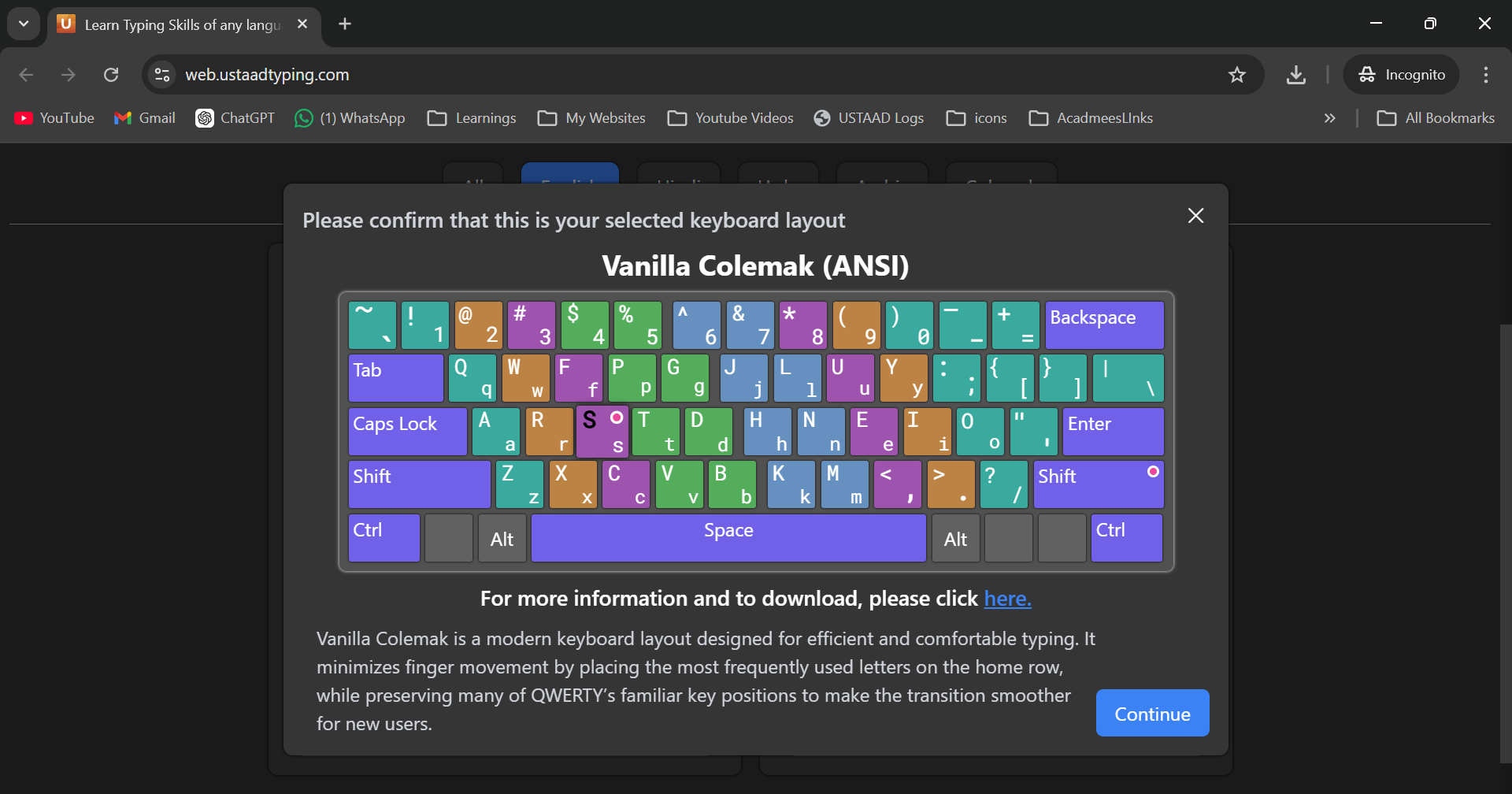
Vanilla Colemak ANSI
Physical Layout: Standard US keyboard with backslash between left shift and Z Key Features:
- Backslash () in standard ANSI position
- Right shift is 1.25u width (standard)
- Compatible with 99% of US keyboards
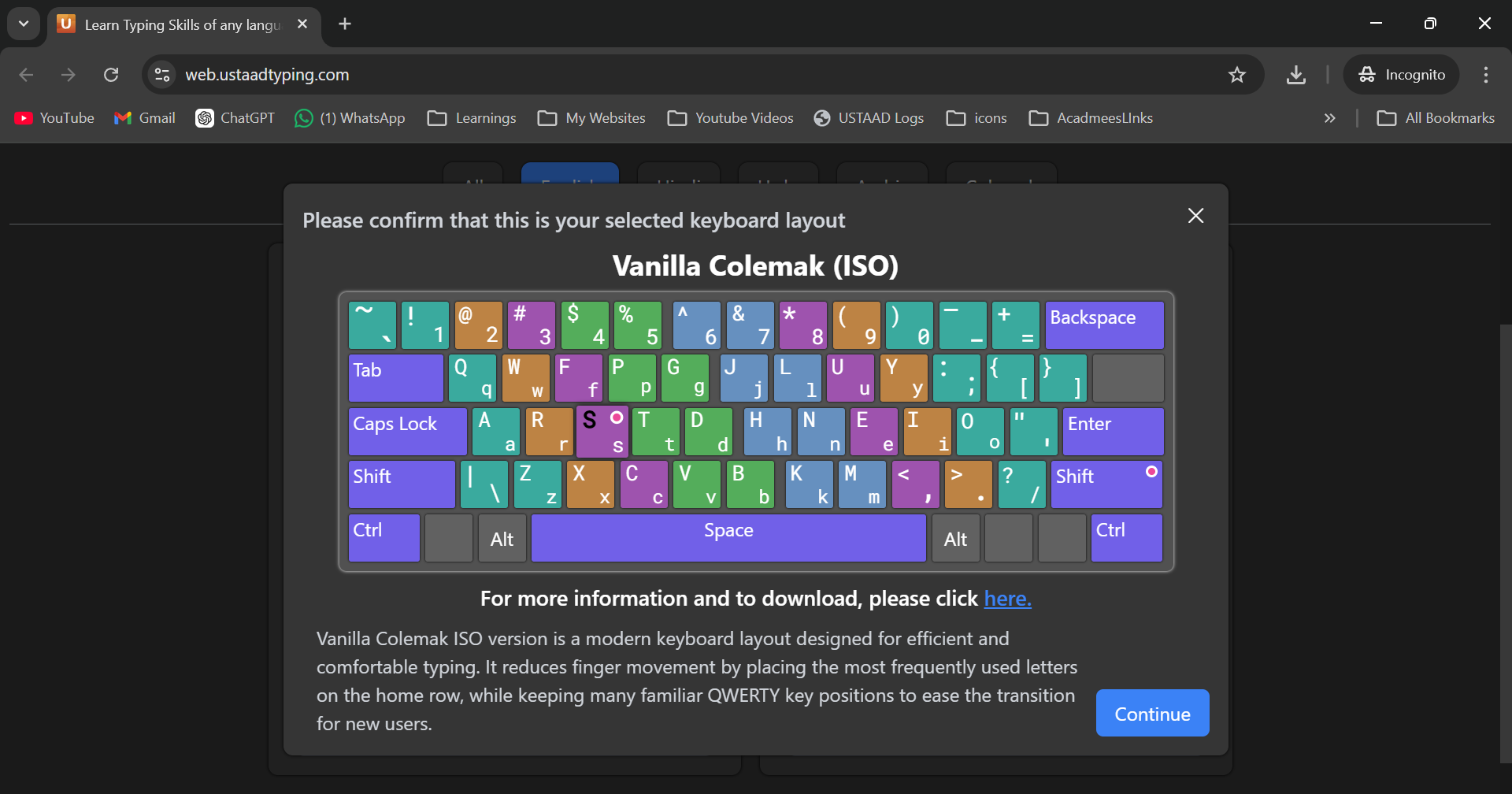
Vanilla Colemak ISO
Physical Layout: European keyboard with additional key between left shift and Z Key Features:
- Extra key for international characters
- Different enter key shape
- Compatible with European keyboards
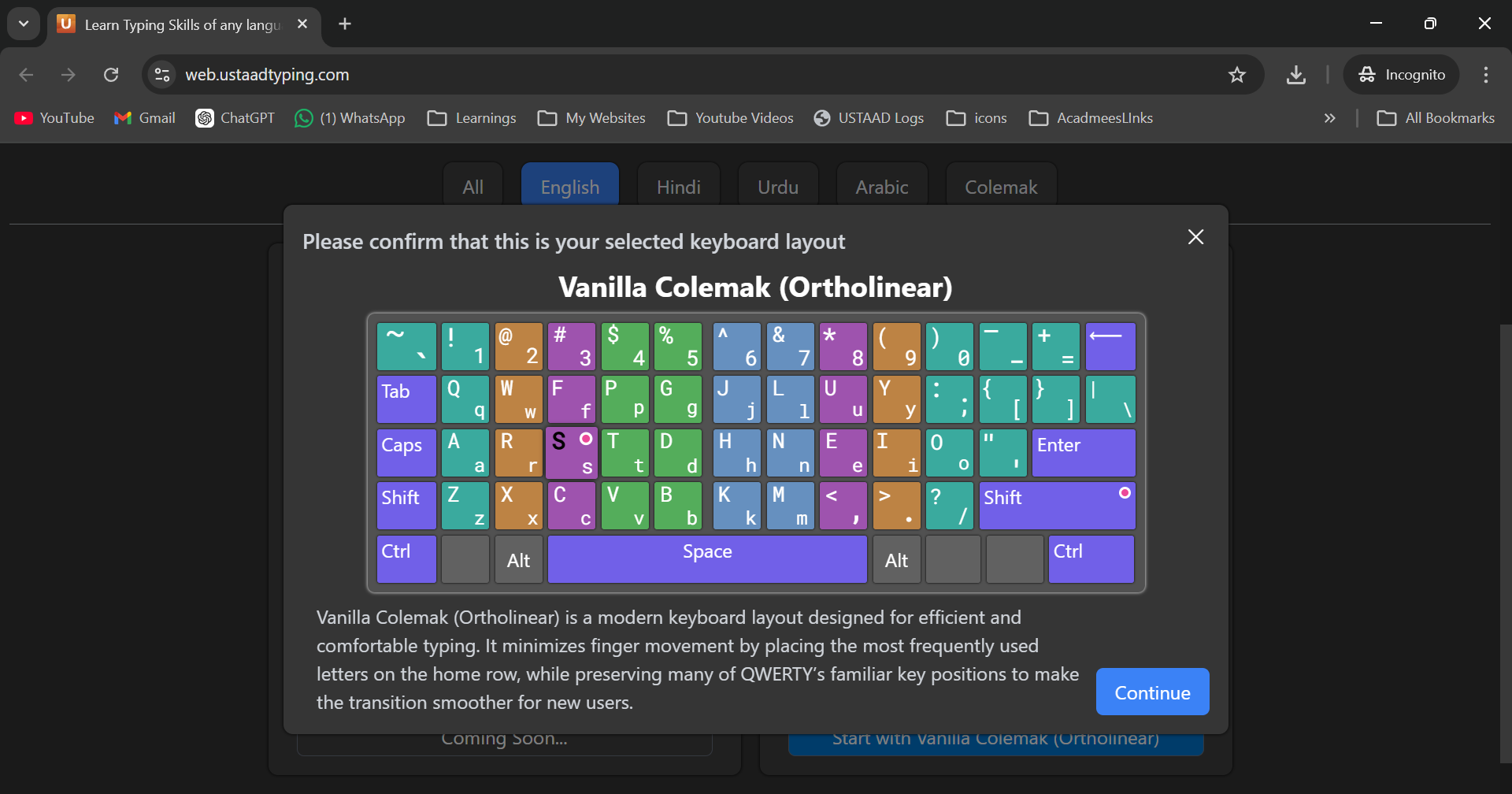
Vanilla Colemak Ortholinear
Physical Layout: Grid arrangement without row staggering Key Features:
- All keys in perfect columns
- Equal key spacing
- Requires ortholinear keyboard hardware
Colemak-DH Variants
Colemak-DH (Dual-Hand) is an enhanced version that further improves ergonomics by moving D and H keys to reduce same-hand transitions.
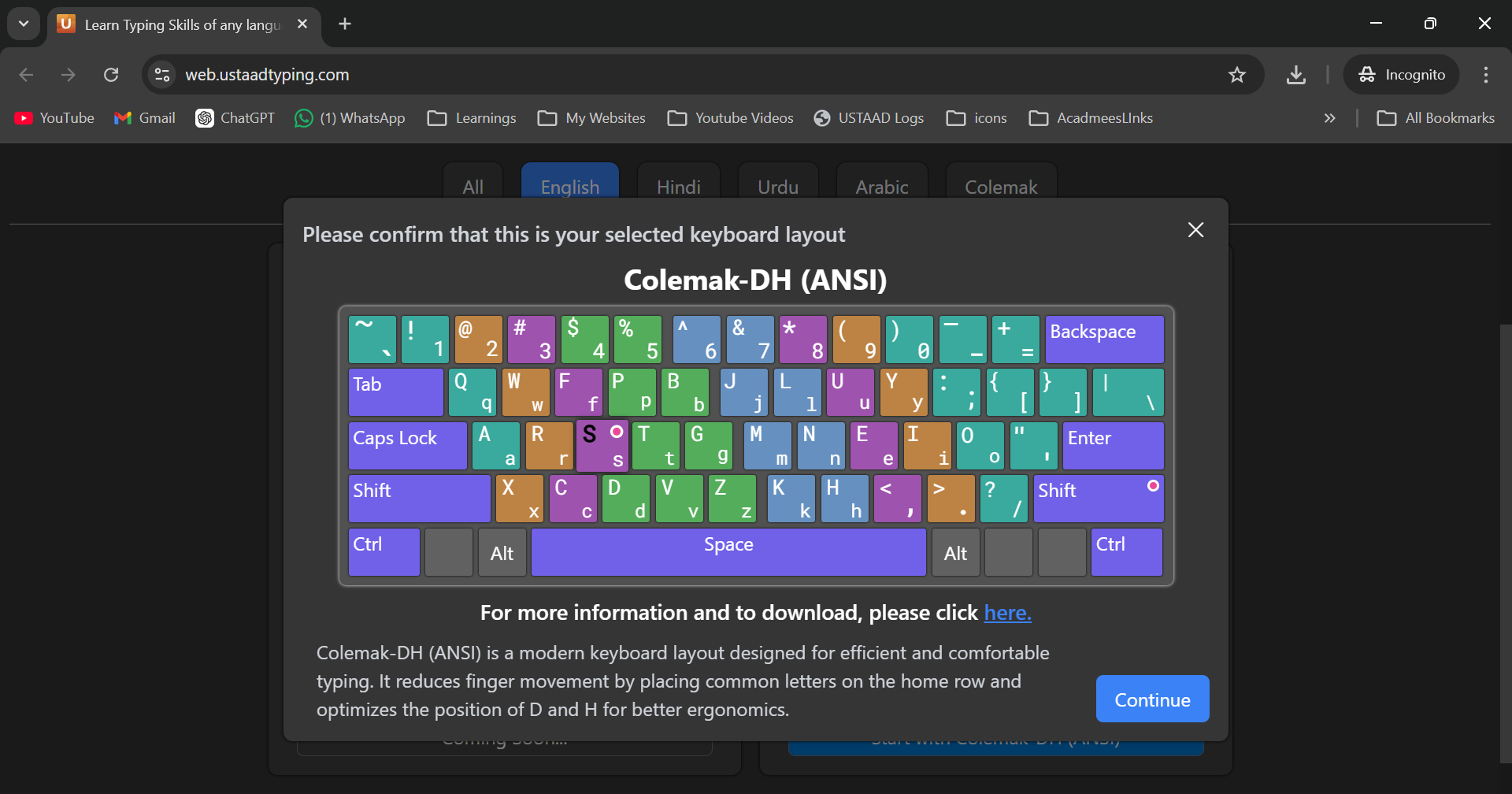
Colemak-DH ANSI
Key Changes from Vanilla:
- D and H positions swapped for better hand alternation
- Reduces consecutive same-hand keystrokes by additional 10%
- Maintains ANSI physical compatibility
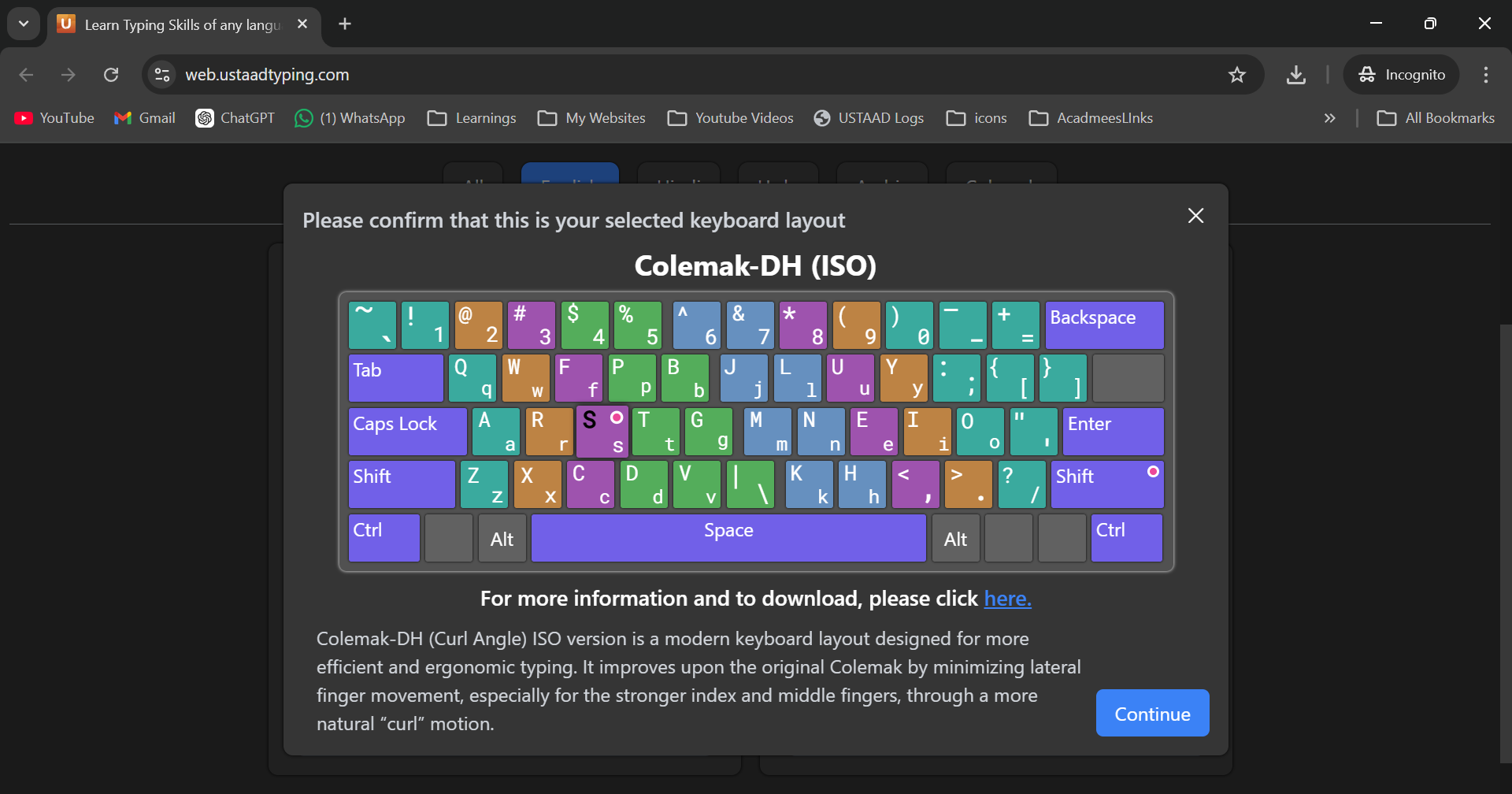
Colemak-DH ISO
Key Changes from Vanilla:
- D and H swap plus ISO physical layout
- European keyboard compatibility
- Enhanced ergonomics for international users
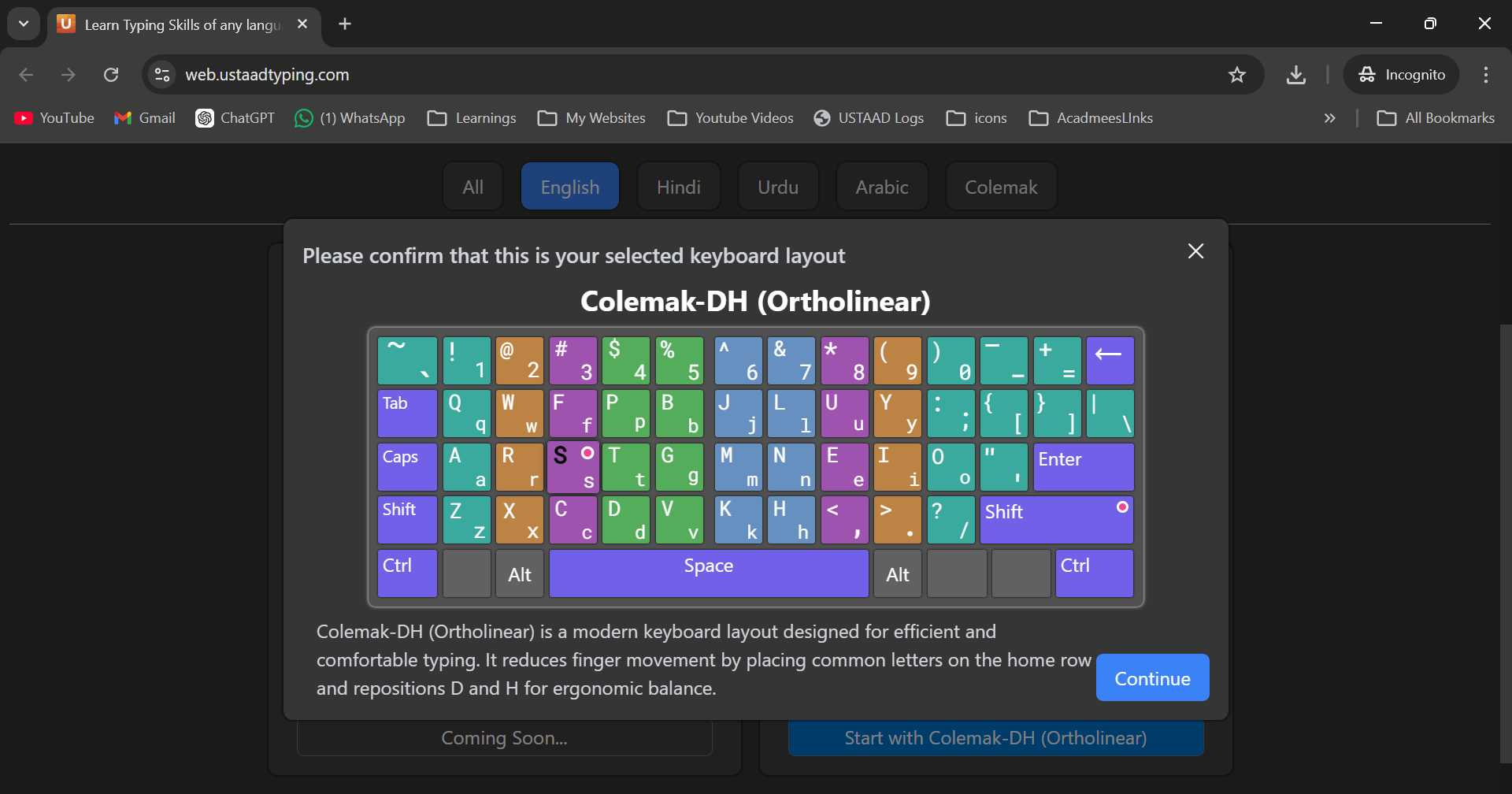
Colemak-DH Ortholinear
Key Changes from Vanilla:
- D and H optimization in grid layout
- Maximum ergonomic benefit
- Requires ortholinear keyboard
Physical Keyboard Differences
ANSI Layout
- Standard US layout
- Backslash key: Between left shift and Z
- Enter key: Single-height, right-aligned
- Right shift: 1.25 unit width
- Compatibility: Most common worldwide
ISO Layout
- European standard
- Extra key: Between left shift and Z (for international characters)
- Enter key: Two-height, inverted L-shape
- Left shift: Slightly shorter
- Compatibility: European and some Asian keyboards
Ortholinear Layout
- Grid arrangement
- No staggering: Keys in perfect columns
- Equal spacing: Uniform key distances
- Compatibility: Specialized ortholinear keyboards only
- Benefits: Reduced finger travel, more efficient
Choosing the Right Variant
Based on Your Keyboard Hardware
If You Have an ANSI Keyboard (Most Common)
- Choose: Colemak-DH ANSI or Vanilla Colemak ANSI
- Why: Direct compatibility, no hardware changes needed
- Recommendation: Colemak-DH ANSI for maximum ergonomics
If You Have an ISO Keyboard
- Choose: Colemak-DH ISO or Vanilla Colemak ISO
- Why: Matches your physical key layout
- Recommendation: Colemak-DH ISO for European users
If You Have Ortholinear Keyboard
- Choose: Colemak-DH Ortholinear
- Why: Takes full advantage of grid layout
- Recommendation: DH version for best ergonomics
Based on Your Typing Goals
Maximum Ergonomics
- Choose: Any Colemak-DH variant
- Why: Additional 10% reduction in same-hand typing
- Best for: Heavy typists, RSI prevention
Ease of Learning
- Choose: Vanilla Colemak variants
- Why: Closer to QWERTY, easier transition
- Best for: Beginners to alternative layouts
Speed Focus
- Choose: Colemak-DH Ortholinear
- Why: Most efficient finger movement
- Best for: Competitive typists, programmers
Switching Between Variants
When to Switch
- Hardware change: New keyboard requires different physical layout
- Ergonomics upgrade: Moving from Vanilla to DH for better comfort
- Performance optimization: Switching to ortholinear for speed gains
Transition Process
- Assess current proficiency — Ensure solid foundation in current variant
- Study differences — Learn key position changes intellectually
- Practice gradually — Start with basic exercises in new variant
- Build speed — Focus on accuracy before speed in new layout
Expected Adjustment Time
- Physical layout change (ANSI↔ISO): 1-2 weeks
- DH upgrade (Vanilla→DH): 2-4 weeks
- Ortholinear transition: 3-6 weeks
Specific Exercises for Each Variant
ANSI Variant Exercises
- Focus: Standard key spacing and positioning
- Special drills: Backslash key integration
- Practice emphasis: Right shift usage patterns
ISO Variant Exercises
- Focus: Extra key utilization
- Special drills: International character combinations
- Practice emphasis: Modified enter key patterns
Ortholinear Variant Exercises
- Focus: Grid-based finger movement
- Special drills: Column-based patterns
- Practice emphasis: Equal finger loading
DH Variant Exercises
- Focus: D and H position optimization
- Special drills: Hand alternation patterns
- Practice emphasis: Reduced same-hand sequences
Hardware Considerations
Keyboard Compatibility
- ANSI variants: Work on 99% of existing keyboards
- ISO variants: Require European-style keyboards
- Ortholinear variants: Need specialized ortholinear keyboards
Keycap Requirements
- Standard profile: Works with all variants
- Sculpted keycaps: May interfere with ortholinear layouts
- Blank keycaps: Recommended for advanced touch typing
Switching Costs
- Software only: ANSI and ISO variants (free)
- Hardware required: Ortholinear variants ($100-300 investment)
- Keycap replacement: Optional for better ergonomics
Performance Differences
Speed Potential
- Vanilla Colemak: 60-75 WPM peak
- Colemak-DH: 65-80 WPM peak
- Ortholinear variants: 70-85+ WPM peak (grid efficiency)
Learning Curve
- Vanilla Colemak: 3-6 months to proficiency
- Colemak-DH: 4-7 months (additional complexity)
- Ortholinear: 5-8 months (physical adaptation)
Ergonomic Benefits
- Vanilla Colemak: 25-30% improvement over QWERTY
- Colemak-DH: 30-35% improvement over QWERTY
- Ortholinear: 35-40% improvement over QWERTY
USTAAD Course Availability
Supported Variants
- ✅ Colemak-DH ANSI — Full course available
- ✅ Colemak-DH ISO — Full course available
- ✅ Colemak-DH Ortholinear — Full course available
- ✅ Vanilla Colemak ANSI — Full course available
- ✅ Vanilla Colemak ISO — Full course available
- ✅ Vanilla Colemak Ortholinear — Full course available
Course Features
- Variant-specific exercises — Optimized for each layout
- Progress tracking — Separate for each variant
- Cross-variant compatibility — Results preserved when switching
- Hardware guidance — Recommendations for optimal setup
Advanced Configuration
Custom Layouts
- Personal modifications — Minor adjustments possible
- Community variants — User-created optimizations
- Experimental layouts — Beta testing new arrangements
Software Integration
- Operating system — Layout switching in OS settings
- Applications — Per-app layout selection
- Keyboard firmware — Hardware-level layout programming
Testing and Benchmarking
- Speed tests — Variant comparison tools
- Ergonomics assessment — Strain monitoring
- Efficiency metrics — Finger travel analysis
Troubleshooting Common Issues
Physical Layout Mismatch
Problem: Keys don't match your keyboard Solution: Choose correct ANSI/ISO/Ortholinear variant for your hardware
DH Confusion
Problem: Difficulty with D/H position changes Solution: Practice hand alternation drills extensively
Ortholinear Adaptation
Problem: Struggling with grid layout Solution: Start with visual column guides, practice slowly
Variant Switching
Problem: Confusion when switching between variants Solution: Use different colored keycaps for each variant
Future of Colemak Variants
Emerging Standards
- Colemak-DH becoming the preferred variant
- Ortholinear growing in popularity
- Custom firmware enabling hardware-level switching
Research Directions
- Further ergonomics optimization
- Language-specific adaptations
- Accessibility improvements
Community Development
- Open-source improvements
- User-contributed variants
- Cross-platform compatibility
By understanding Colemak variants, you can select the optimal layout for your hardware and typing needs, maximizing both efficiency and comfort in your typing journey.