Colemak Layout Mastery Guide
This comprehensive guide explores Colemak, the modern ergonomic keyboard layout designed for maximum typing efficiency and comfort. USTAAD Typing Academy offers complete Colemak courses to help you transition from traditional layouts and achieve professional-level typing speeds with reduced physical strain.
What is Colemak?
Colemak is an alternative keyboard layout created in 2006 by Shai Coleman, designed to optimize typing efficiency while maintaining some familiarity with QWERTY for easier learning.
Layout Philosophy
- Ergonomic optimization — Minimize finger movement and strain
- High-frequency letters — Common letters on home row
- Alternating hands — Reduce same-hand typing sequences
- QWERTY compatibility — Easier transition than other alternatives
Colemak vs QWERTY: Efficiency Comparison
Colemak offers significant improvements over QWERTY in key ergonomic metrics.
Finger Travel Distance
- QWERTY: Average 2,500-3,000 meters of finger travel per day
- Colemak: Average 1,800-2,200 meters of finger travel per day
- Improvement: 25-30% reduction in finger movement
Same-Finger Usage
- QWERTY: 3.6% of keystrokes use same finger consecutively
- Colemak: 1.8% of keystrokes use same finger consecutively
- Improvement: 50% reduction in same-finger typing
Hand Alternation
- QWERTY: 52% of keystrokes alternate hands
- Colemak: 62% of keystrokes alternate hands
- Improvement: 19% better hand alternation
Home Row Usage
- QWERTY: 32% of keystrokes on home row
- Colemak: 43% of keystrokes on home row
- Improvement: 34% more home row utilization
Colemak Layout Overview
Full Layout
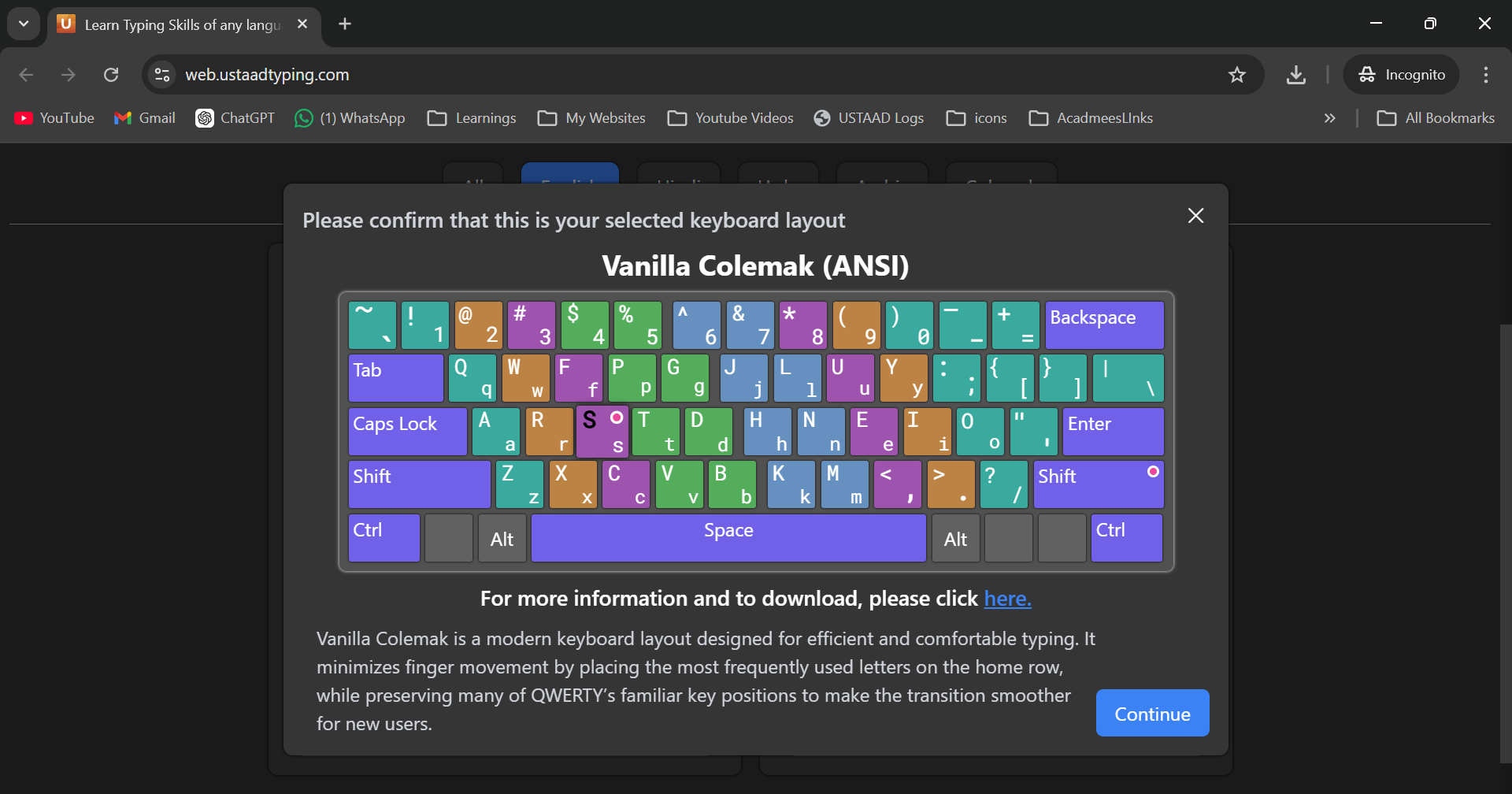
Key Position Changes from QWERTY
- E moves to I position — Most common vowel on home row
- T moves to R position — Common consonant easily accessible
- R moves to S position — Better hand alternation
- D and H swap — Improved finger balance
Finger Assignments
- Left hand: Q W A R S Z X C V B (optimized for common keys)
- Right hand: P G J L U Y ; H N E I O (balanced load)
- Home row: A R S T D H N E I O (70% of English text)
Ergonomic Advantages
Reduced Physical Strain
- Less finger extension — More keys on home row
- Better hand balance — Even workload distribution
- Minimized stretches — Common combinations closer together
- Lower tendon stress — Reduced repetitive motion
Long-Term Health Benefits
- RSI prevention — Less strain on wrists and fingers
- Posture improvement — More natural hand positioning
- Fatigue reduction — Less energy expenditure
- Injury recovery — Easier on existing conditions
Learning Curve Expectations
Transition Timeline
- Week 1-2: Basic layout memorization (5-15 WPM)
- Week 3-4: Word formation skills (15-25 WPM)
- Week 5-8: Sentence fluency (25-35 WPM)
- Month 3-6: Professional proficiency (35-50+ WPM)
Difficulty Factors
- Initial slowdown — 50-70% speed reduction initially
- Muscle memory conflict — QWERTY habits interfere
- Letter position changes — Most common letters relocated
- Coordination challenges — New finger patterns required
Success Factors
- Consistent practice — Daily sessions essential
- Patience — Learning curve is 3-6 months
- QWERTY unlearning — Must overcome old habits
- Motivation — Health benefits drive persistence
Course Structure in USTAAD
Colemak follows the same 4-chapter structure as other layouts, optimized for ergonomic learning.
Chapter 1: Base Version (Lowercase Letters)
Focus: Building ergonomic habits from the start
- Home row emphasis — 70% of practice on A-R-S-T-D-H-N-E-I-O
- Finger balance — Equal workload distribution
- Common combinations — THE, AND, FOR, ARE on home row
Chapter 2: Shift Version (Uppercase + Lowercase)
Focus: Shift coordination with ergonomic positioning
- Shift finger training — Proper pinky usage
- Capital patterns — Sentence and name capitalization
- Ergonomic shifts — Reduced stretch requirements
Chapter 3: Numbers (0-9 Keys)
Focus: Number row with minimal finger strain
- Balanced access — Numbers distributed across fingers
- Common sequences — Optimized for data entry
- Symbol combinations — Shift-number ergonomics
Chapter 4: Special Symbols
Focus: Complete character set with comfort
- Punctuation placement — Easy access to common symbols
- Special characters — Ergonomic symbol combinations
- Professional typing — Full document creation capability
Exercise Structure (8 Exercises per Chapter)
Each chapter includes 8 progressively challenging exercises:
- Keys Introduction — Individual character practice with ergonomic guides
- Word Building — Common English words using Colemak advantages
- Sentence Practice — Complete sentences emphasizing home row
- Paragraph Practice — Multi-sentence text with natural flow
- Speed Development — Timed exercises building ergonomic speed
- Review Games — Interactive reinforcement activities
- Advanced Combinations — Complex ergonomic patterns
- Chapter Assessment — Comprehensive proficiency evaluation
Transition Tips from QWERTY
Preparation Phase
- Study layout intellectually — Learn key positions before typing
- Understand benefits — Motivation drives persistence
- Set realistic expectations — Accept temporary slowdown
- Prepare environment — Label keys if needed
Learning Phase
- Start slow — Accuracy over speed initially
- Use visual guides — Finger positioning reminders
- Practice daily — Short, focused sessions
- Track progress — Celebrate small improvements
Acceleration Phase
- Build muscle memory — Repetition creates automaticity
- Increase speed gradually — Don't rush the process
- Mix practice types — Variety prevents boredom
- Monitor ergonomics — Ensure proper technique
Efficiency Statistics and Benefits
Speed Potential
- Learning period: 3-6 months to reach QWERTY-equivalent speed
- Peak performance: 60-80+ WPM possible with practice
- Sustained speed: Better maintained over long sessions
- Accuracy: Higher long-term accuracy due to comfort
Productivity Gains
- Reduced fatigue — Less tired after long typing sessions
- Fewer errors — More comfortable, fewer mistakes
- Better focus — Less physical distraction
- Longer sessions — Can type longer without breaks
Health Improvements
- Lower RSI risk — 50% reduction in repetitive strain
- Better posture — More natural hand positioning
- Reduced pain — Less finger and wrist strain
- Injury prevention — Proactive ergonomic design
Common Challenges and Solutions
QWERTY Interference
Problem: Old muscle memory conflicts with new layout Solution: Practice Colemak exclusively, avoid QWERTY during transition
Initial Slowdown
Problem: Significant speed reduction initially Solution: Focus on accuracy, speed will return with practice
Letter Position Confusion
Problem: Difficulty remembering new key locations Solution: Use keyboard overlays, practice position drills
Motivation Maintenance
Problem: Steep learning curve causes discouragement Solution: Track progress metrics, remember long-term benefits
Professional Applications
Ideal Use Cases
- Heavy typists — Writers, programmers, data entry specialists
- RSI sufferers — Those with existing typing injuries
- Long sessions — Extended computer work requirements
- Ergonomic priority — Health-conscious computer users
Industry Adoption
- Programming — Popular among software developers
- Writing — Preferred by authors and journalists
- Data entry — Used in ergonomic workplaces
- Education — Taught in some typing courses
Advanced Colemak Techniques
Touch Typing Optimization
- Home row mastery — 70% of typing on A-R-S-T-D-H-N-E-I-O
- Finger specialization — Each finger optimized for specific keys
- Look-ahead reading — Plan finger movements ahead
- Rhythm development — Smooth, efficient typing cadence
Speed Building Strategies
- Common word practice — THE, AND, FOR, ARE on home row
- Phrase memorization — Efficient finger patterns
- Burst training — Short high-speed intervals
- Endurance building — Long session comfort
Tools and Resources
USTAAD Colemak Features
- Ergonomic guides — Finger positioning optimization
- Progress analytics — Efficiency and comfort metrics
- Custom exercises — Ergonomic pattern practice
- Health monitoring — Strain reduction tracking
Additional Resources
- Colemak keyboard overlays — Physical learning aids
- Online communities — Support and motivation
- Speed comparison tools — Performance benchmarking
- Ergonomic assessments — Health benefit tracking
Certification and Assessment
Colemak Proficiency Levels
- Beginner: Basic layout familiarity (20 WPM)
- Intermediate: Functional typing (30 WPM)
- Advanced: Efficient typing (40 WPM)
- Expert: Master level (50+ WPM)
Assessment Criteria
- Ergonomic efficiency: Finger travel minimization
- Speed consistency: Sustainable typing speed
- Accuracy maintenance: High accuracy at speed
- Comfort level: Reduced fatigue indicators
Colemak represents the future of ergonomic typing, offering significant health benefits and efficiency improvements over traditional layouts. With USTAAD's comprehensive course, you can master this superior layout and enjoy more comfortable, productive typing for years to come.