Arabic Keyboard Layouts Guide
Typing in Arabic requires understanding how the Arabic script is mapped onto a standard keyboard. Unlike some phonetic systems, Arabic typing is based on standardized layouts designed for consistent and efficient input.
In this guide, you’ll learn about the most commonly used Arabic keyboard layouts and how to choose the right one for your typing needs.
What are Arabic Keyboard Layouts?
Arabic keyboard layouts define how Arabic letters (ا، ب، ت، etc.) are assigned to keys on a physical keyboard.
Since most keyboards are originally designed for English, these layouts provide a structured way to type Arabic accurately and efficiently.
Different layouts exist to support:
- Beginners learning Arabic typing
- Users switching between languages
- Advanced typists aiming for speed and precision
Main Arabic Keyboard Layouts
In modern Arabic typing, the most widely used layouts are standardized variations commonly known as:
- Arabic 101
- Arabic 102
USTAAD Typing Academy provides support for both.
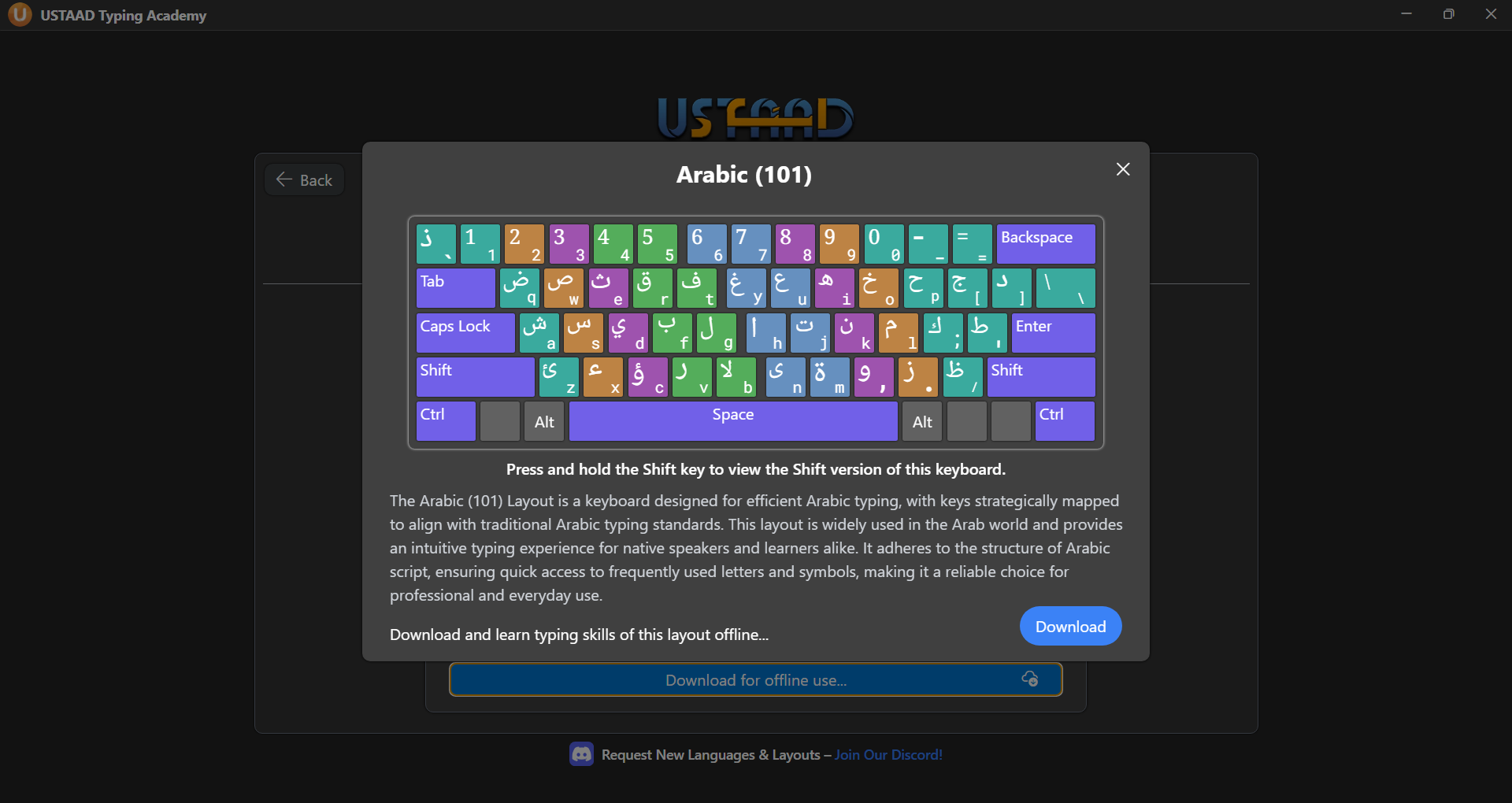
1. Arabic 101 Layout
- Most commonly used Arabic keyboard layout
- Default layout in many operating systems
- Widely used across different regions
- Balanced for general typing needs
👉 Example:
- Each key corresponds directly to an Arabic character
- Layout is fixed and consistent
This layout is ideal for most users and is recommended for beginners.
2. Arabic 102 Layout
- Alternative version of the Arabic keyboard
- Includes additional keys or slight variations
- Used in specific regions and systems
- Useful for users needing extended character access
This layout is often preferred by:
- Advanced users
- Users familiar with regional keyboard variations
Why Arabic Layouts Matter
Using the correct keyboard layout is essential because:
- It ensures accurate character input
- Improves typing speed over time
- Reduces confusion while learning
- Helps maintain consistency across devices
✅ Arabic 101 and 102 are the standard layouts, which is why they are supported in USTAAD Typing Academy.
Keyboard Layout Visuals
Visual reference helps you quickly understand key placement.
Arabic 101 Layout
Arabic 102 Layout
Which Arabic Layout Should You Choose?
Your choice depends on your usage:
- Beginner? → Start with Arabic 101
- General typing? → Arabic 101 is sufficient
- Need extended keys? → Use Arabic 102
- Already familiar? → Continue with your current layout
Consistency is important — switching layouts frequently can slow your progress.
Learn Arabic Typing with USTAAD Typing Academy
USTAAD Typing Academy provides dedicated Arabic typing courses for:
- Arabic 101
- Arabic 102
With USTAAD, you can:
- Learn Arabic typing step-by-step
- Practice with structured lessons
- Improve speed and accuracy
- Track your progress over time
The platform helps you move from basic typing to confident, fluent Arabic typing.
Final Thoughts
Arabic typing becomes much easier once you understand your keyboard layout. While both 101 and 102 layouts are widely used, choosing one and practicing consistently is the key to improvement.
Stay consistent, follow structured lessons, and build your typing skills step by step.